
Change SASSA Phone Number: A Complete 2025 Guide
Imagine missing out on your SASSA grant payment just because an SMS didn’t reach you. It might sound like a small mistake, but having an outdated phone number linked to your SASSA profile can create serious problems. Whether you’ve changed your SIM card, lost your phone, or made a typo during application, it’s essential to ensure your contact details are always up to date.
In this guide, we walk you through every method to change your SASSA phone number in 2025—online, offline, with or without your application ID, and even for other types of grants. This article simplifies the process, removes confusion, and empowers you to take control of your grant access.
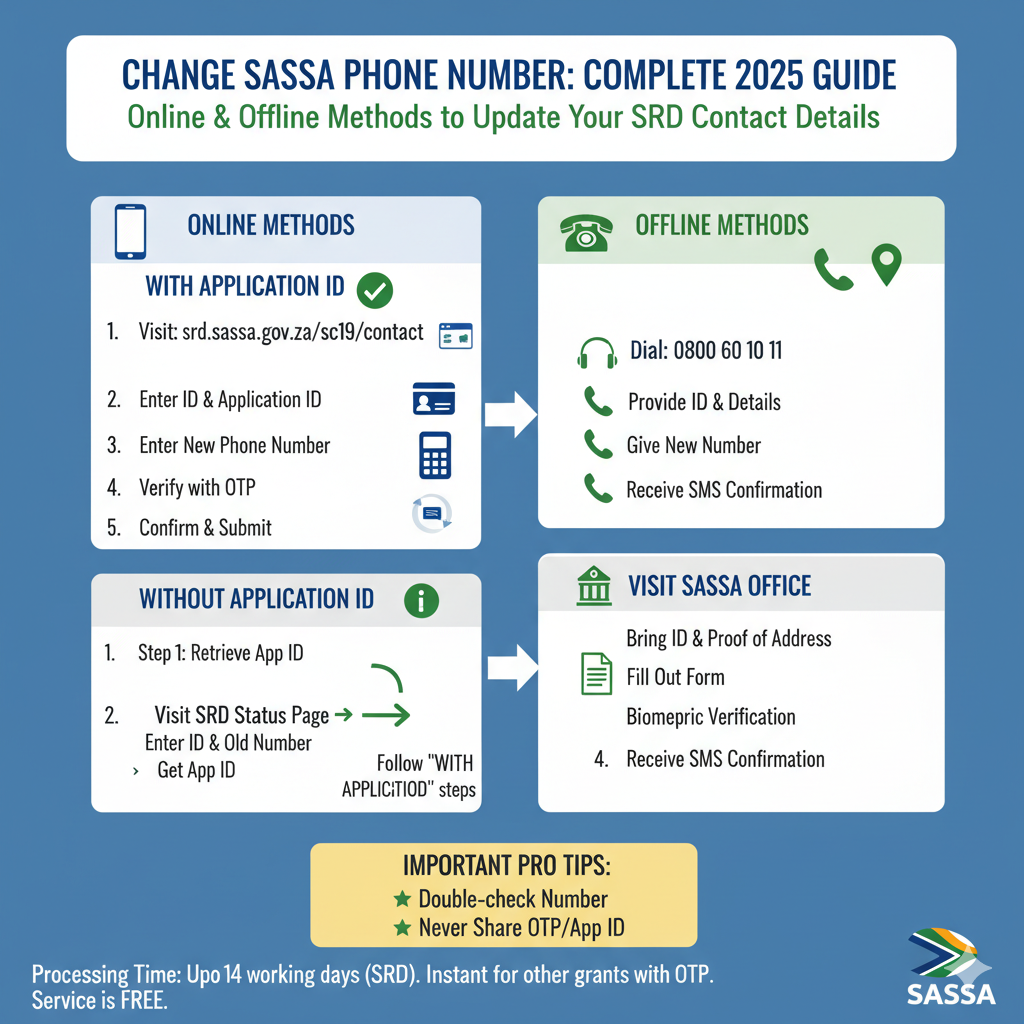
Why You Must Change Your SASSA Phone Number
If you’re relying on SASSA for your monthly support, your phone number is more than just a contact method—it’s your lifeline to important notifications, payment alerts, and application updates. Here’s why updating your phone number is so important:
- Lost or Stolen SIM/Phone: If someone else gets access to your number, they might also access sensitive details.
- New SIM or Provider: Maybe you’ve switched networks and your old number is inactive.
- Typos or Incorrect Numbers: A simple mistake while typing your number during application can cut off all communication from SASSA.
- Used Someone Else’s Number: If you initially used a friend or family member’s number, it’s better to switch it to your personal one.
- Privacy Concerns: Want to keep your grant matters private? Updating your contact details ensures only you get the messages.
Your phone number isn’t just a formality—it’s how you access your money. That’s why we’re here to help you update it the right way.
What You Need Before Starting
Before diving into the update process, it helps to gather a few essential items. Having everything ready will save you time and frustration:
- Your 13-digit South African ID Number
- SASSA Application ID (if available)
- Old Phone Number (if you still have access)
- New Active Phone Number (registered in your name)
- Proof of Address (for in-person updates)
- Internet Connection (for online updates)
Even if you don’t have your application ID, don’t worry—you can retrieve it (we’ll show you how).
Changing Your Phone Number Online (With Application ID)
The easiest way to change your phone number is through SASSA’s official SRD website—especially if you already have your application ID. Here’s how you do it:
- Visit the Update Page: Head over to srd.sassa.gov.za/sc19/contact.
- Fill In Your Details: Enter your 13-digit ID number and 6-digit application ID.
- Choose to Change Phone Number: Select the option to update your phone number.
- Enter New Number: Carefully input your new cellphone number.
- Verify with OTP: SASSA will send a one-time pin (OTP) to your new number. Enter it to confirm.
- Confirm and Submit: After verification, confirm the change and click submit.
- Wait for Update: SASSA may take up to two weeks to reflect the changes in their system.
It’s that simple—but only if you have your application ID. If you don’t, keep reading.
Changing Phone Number Online (Without Application ID)
Don’t remember your application ID? It happens more often than you’d think. Here’s a two-step workaround to retrieve your ID and update your number:
Step 1: Retrieve Your Application ID
- Visit the SRD Status Check page.
- Enter your South African ID and the old cellphone number you registered with.
- Click Submit.
- Your application details will appear, including your application ID. Note it down.
Step 2: Change Your Number
Now that you’ve got your application ID, go back to the update portal and follow the regular steps to change your number.
What If You Don’t Have Internet? Offline Options
If you don’t have access to a phone with internet or simply prefer human interaction, SASSA offers two offline ways to update your number:
1. Call the SASSA Helpline
- Dial 0800 60 10 11 during office hours (Mon–Fri, 8 AM to 5 PM).
- Tell the agent you want to update your SRD grant number.
- Provide your ID, old phone number, and answer verification questions.
- Give them your new number.
- You’ll receive confirmation via SMS once processed.
2. Visit a SASSA Office
Prefer a face-to-face option? Visit your nearest SASSA office:
- Bring your ID, new number, and proof of address.
- Tell them you want to update your phone number.
- Fill out the provided form.
- They’ll verify your details and complete the update.
- You’ll get an SMS confirmation once it’s done.
Tip: Visit early in the morning to avoid long queues.
Updating Number for Other SASSA Grants (Not SRD)
Changing your phone number for other social grants like Old Age, Disability, or Child Support Grants involves a slightly different process:
- Log in to the SASSA Services Portal.
- Navigate to “Manage My Personal Information.”
- Update your contact number.
- You’ll receive an OTP on your old number—enter it to confirm.
- Your details will update immediately.
This method is ideal for beneficiaries managing long-term grants beyond the temporary SRD grant.
Biometric Verification: Is It Required?
Yes. For security, SASSA may require biometric verification (usually facial recognition) before accepting your number change. Here’s what to expect:
- After submitting your request, SASSA may send an SMS with a verification link.
- Click the link and follow the facial recognition steps using your smartphone.
- Ensure good lighting and a clear camera image.
Failing to complete this step might delay or cancel your update request.
Common Problems & Easy Fixes
- Not Getting OTPs? Check your signal, inbox space, and message settings. Retry in a few hours.
- System Errors? Wait and try again later or switch browsers.
- Incorrect App ID? Retrieve it using the steps above.
Remember: patience is key. If all else fails, call or visit SASSA for support.
Tips Before You Submit Your Request
- Only one request per day is allowed.
- Always double-check your number before submitting.
- Use only South African-registered numbers.
- Keep screenshots or confirmations for your records.
- Never share your OTP or app ID with others.
Protecting your grant starts with protecting your information.
Conclusion
Updating your SASSA phone number may seem technical, but with the right guidance, it’s a simple process. Whether you choose the online route or prefer to speak to a SASSA agent, you now have all the tools and instructions to get it done.
Stay ahead. Keep your number updated. And never miss another grant notification again.