
SASSA Contact Information 2026: How to Reach SASSA Quickly (Phone, WhatsApp, Email, Offices & More)
If your grant is late, your SRD status looks wrong, or you’ve changed your cellphone number, you only really care about one thing:
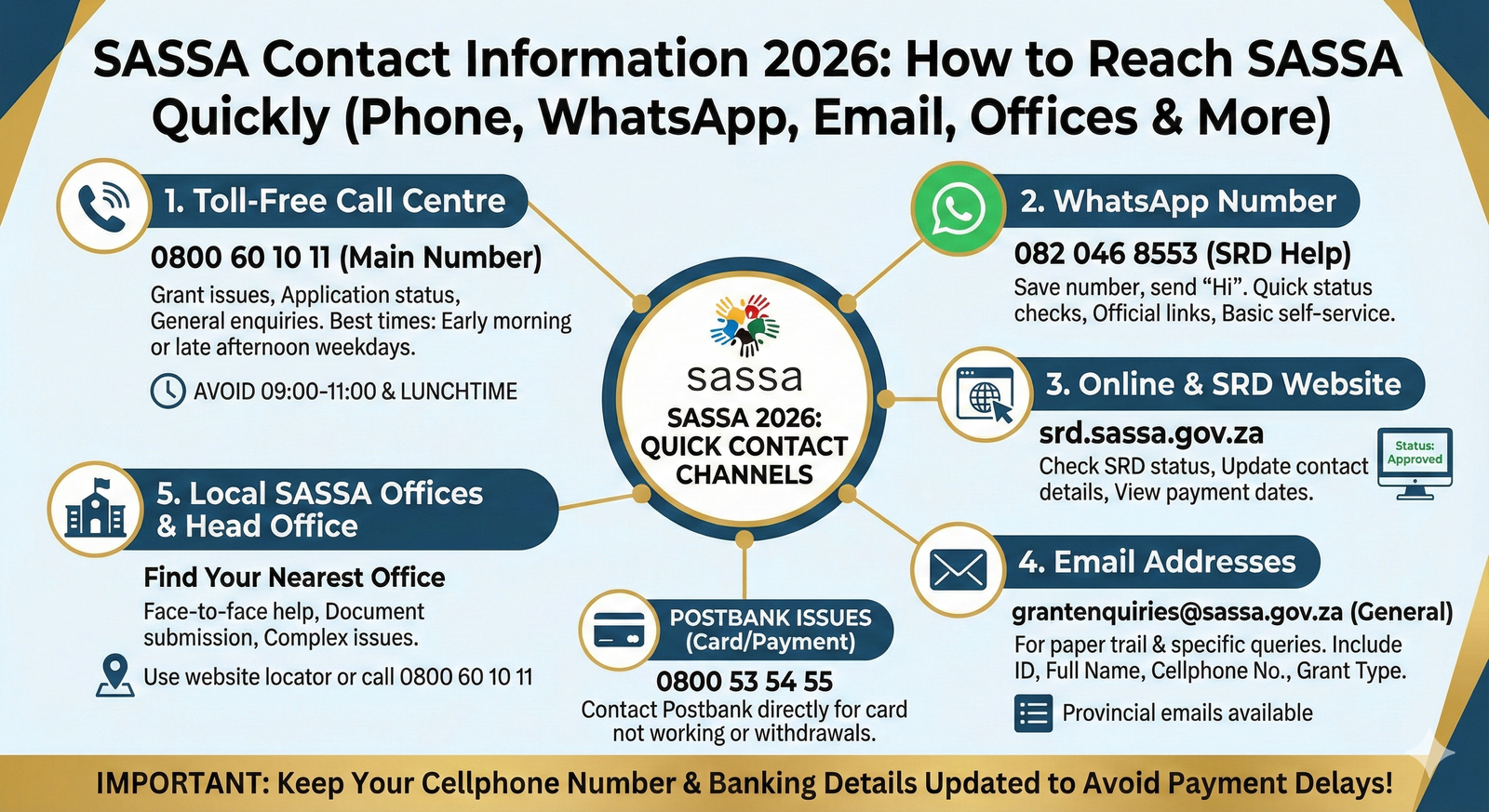
“How do I get hold of SASSA – and actually get help?”
This guide pulls together all the SASSA contact details for 2026 in one place and explains, in plain language:
- All the ways to contact SASSA (phone, WhatsApp, website, email, local offices)
- Exactly when and how to use each method
- What information you should have ready before you call or write
- How to update your contact details so you don’t miss SMSes or payments
- Extra contacts like Postbank if your SASSA/Postbank card is the problem
Why Keeping Your SASSA Contact Details Updated Really Matters
SASSA communicates with you mainly via your cellphone number and sometimes by letter or email. If your details are wrong or outdated:
- You might miss SMS payment notifications
- You might not receive important messages about verification, document requests or appeals
- SRD and other grant payments can be delayed or put on hold until you confirm your details
That’s why, if you:
- Change your cellphone number
- Move to a different address
- Open a new bank account for your grant
…you should update SASSA as soon as possible via the website, call centre, email, or a local office (all explained below).
All the Ways to Contact SASSA in 2026 (Explained)
1. SASSA Toll-Free Call Centre
Main SASSA Contact Number (Toll-Free):
📞 0800 60 10 11
You can use this number for:
- Grant payment issues (late or missing payments)
- Application status queries (Old Age, Disability, Child Support, etc.)
- SRD/R350 help and information
- Complaints, fraud reporting and general grant enquiries
Best times to call:
- Avoid 09:00–11:00 and lunchtime – these are the busiest hours
- Try calling early in the morning or later in the afternoon on weekdays
Have this ready before you call:
- Your 13-digit South African ID number
- Your cellphone number registered with SASSA
- Your application/reference number if you have one
- Brief notes on what the problem is (e.g., “SRD approved but no payment for August”)
The call centre can see your record on their system and often tell you:
- Whether your grant is active, suspended or declined
- Whether your payment has been processed
- What step you need to take next
2. SASSA WhatsApp Number
SASSA uses WhatsApp as a quick, automated help channel – especially for SRD.
Official SASSA WhatsApp number:
📲 082 046 8553
How to use it:
- Save the number 082 046 8553 in your contacts as “SASSA WhatsApp”.
- Open WhatsApp and send a simple message like “Hi”.
- You’ll receive a menu with options – usually including:
- Check SRD status
- Update certain details
- Get information on how to apply
- Follow the prompts and respond with your ID number and cellphone when asked.
What WhatsApp is good for:
- Quick SRD status checks
- Getting official links (no guessing website addresses)
- Basic self-service without calling or visiting an office
It’s not perfect for complex problems, but it’s a fast way to check your status before you phone or travel to a branch.
3. SASSA Online & SRD Website
For SRD and some other services, SASSA relies heavily on its online portal.
Main SRD Website:
🌐 https://srd.sassa.gov.za
On the site you can usually:
- Check your SRD status (approved, pending, declined)
- See payment dates for specific months
- Update contact numbers and sometimes banking details for SRD
- Submit or track certain appeals
How to update contact details for SRD online:
- Go to srd.sassa.gov.za in your browser.
- Look for an option like “Change Contact Details” or similar (labels sometimes change over time).
- Enter your ID number and current cellphone number.
- Follow the prompts to enter your new number and confirm via OTP/SMS.
Always make sure the address is the official SASSA domain (sassa.gov.za) before typing in your ID details.
4. SASSA Email Addresses
If you prefer writing things down – or want a paper trail – email can be useful.
General grant enquiries (all grants, including SRD):
📧 grantenquiries@sassa.gov.za
Some regions also use provincial grant enquiry emails, for example:
- Western Cape –
GrantEnquiriesWC@sassa.gov.za - KwaZulu-Natal –
GrantEnquiriesKZN@sassa.gov.za - Eastern Cape –
GrantEnquiriesEC@sassa.gov.za - Gauteng –
GrantEnquiriesGP@sassa.gov.za - Limpopo –
GrantEnquiriesLIM@sassa.gov.za - Free State –
GrantEnquiriesFS@sassa.gov.za - Mpumalanga –
GrantEnquiriesMP@sassa.gov.za - Northern Cape –
GrantEnquiriesNC@sassa.gov.za - North West –
GrantEnquiriesNW@sassa.gov.za
Your article can list these region emails exactly as above for SEO and user convenience.
How to write an email that actually gets a response
In your email include:
- Subject line: Clear and specific, e.g. “SRD R350 – Approved but unpaid for August 2025 – ID 900101…”
- Body of the email:
- Your full name
- Your ID number
- Your cellphone number registered with SASSA
- The type of grant (SRD, Old Age, Disability, Child Support etc.)
- Exact months you’re querying (e.g. “June & July 2025 not paid”)
- Any reference numbers from previous calls/emails
- Short description of the problem
The clearer and more complete your email, the easier it is for SASSA staff to help without going back-and-forth.
5. Visiting a Local SASSA Office
Sometimes you just need to talk to someone face to face – especially when:
- You’re applying for a permanent grant (Old Age, Disability, etc.)
- You need to submit documents or sign forms
- Your grant has been suspended, dormant or under review
- Online and call centre options have not fixed the problem
SASSA has:
- A Head Office in Pretoria
- 9 regional offices (one per province)
- Many local service offices across South Africa
Key SASSA Head Office Contact Details
From SASSA’s official website, the main head office contact is:
- Physical address:
501 Prodinsa Building,
Cnr Steve Biko & Pretorius Streets,
Pretoria - Postal address:
Private Bag X55662, Arcadia, Pretoria, 0083 - Switchboard:
☎️ 012 400 2000 - Customer Care / Call Centre (toll-free):
☎️ 0800 60 10 11 - Email:
📧 GrantEnquiries@sassa.gov.za - Website:
🌐 www.sassa.gov.za
Your article can keep the above almost as-is since users often search these exact details.
Examples of Regional & Local SASSA Offices (By Province)
Rather than try to list every single office in South Africa (which changes often), it’s best to:
- Show a handful of key regional offices with phone numbers
- Remind users to use the office locator or call SASSA for the latest details
Below are examples based on SASSA’s published info and your outline:
Western Cape Regional Office (Example)
- Address: Golden Acre Building, Adderley Street, Cape Town, 8001
- Postal: Private Bag X9189, Cape Town, 8000
- Tel: 021 469 0200
- Fax: 021 469 0260
- Email:
GrantEnquiriesWC@sassa.gov.za
KwaZulu-Natal Regional Office
- Address: 1 Bank Street, Pietermaritzburg, 3201
- Tel: 033 846 3300 (older listings sometimes show 033 846 3365)
- Email:
GrantEnquiriesKZN@sassa.gov.za
Eastern Cape Regional Office
- Address: BKB Building, Cnr Fitzpatrick & Merino Road, Quigney, East London, 5200
- Tel: 043 707 6300
- Email:
GrantEnquiriesEC@sassa.gov.za
Gauteng Regional Office
- Address: 28 Harrison Street, Johannesburg, 2000
- Tel: 011 241 8300
- Email:
GrantEnquiriesGP@sassa.gov.za
Limpopo, Free State, Northern Cape, Mpumalanga, North West
You can keep the addresses and numbers from your original outline and combine them with the regional grant enquiry emails above, but it’s smart to add a short note in your article:
“Regional managers and telephone extensions can change. For the most up-to-date details, use the SASSA office locator on the official website or phone the toll-free call centre.”
How to Find a SASSA Office Near You (Without Guesswork)
Instead of relying only on static lists, show readers how to find the nearest office in real time.
Option 1 – SASSA Service Office Map / Locator
On the SASSA site there is a Service Offices Map and “Head Office and Regional Contacts” page that link to local offices by province.
Steps to follow:
- Visit www.sassa.gov.za
- Look for links like “Contact Us”, “Service Offices Map” or “Head Office and Regional Contacts”
- Select your province to see a list/map of nearby offices
Option 2 – Call to Ask for the Nearest Office
You can phone:
- SASSA’s national switchboard: 012 400 2000
- Or the toll-free call centre: 0800 60 10 11
Ask:
“Please give me the address and hours of my nearest SASSA office. I live in [your suburb/town].”
Option 3 – Community & Local Info
You can also:
- Ask at your local Post Office – they often know nearby SASSA branches
- Check SASSA’s official social media accounts for office updates or temporary closures
Don’t Forget Postbank: Card & Payment Channel Issues
If your problem is specifically about:
- SASSA/Postbank card not working
- Postbank Black Card or SASSA Gold Card withdrawals
- Strange card transactions or potential fraud
…then SASSA may tell you to contact Postbank directly.
Postbank Customer Care:
- ☎️ 0800 53 54 55 (customer care centre)
- 📧 postbank.enquiries@postoffice.co.za
- 📧 PBHelpdesk@postbank.co.za (for some online helpdesk issues)
Postbank is responsible for the technical bank account and card, while SASSA is responsible for grant approval and amounts.
So, think of it like this:
- SASSA = “Am I approved? How much must I get?”
- Postbank = “Why is my card/ATM/transaction not working?”
Troubleshooting Common SASSA Contact & Grant Issues
A. Payment Delays
Possible causes:
- Your grant is approved but payment date not reached yet
- Incorrect or outdated cellphone or bank details
- Banking problems at Postbank or your own bank
- System delays or backlogs at SASSA
What to do:
- Check your status and payment date on the SRD site or via WhatsApp (for SRD).
- Confirm your banking details and contact details are correct.
- If everything looks right but money is still missing, contact SASSA via:
- Call centre – 0800 60 10 11
- Email – grantenquiries@sassa.gov.za
- Local office visit for long-standing or complex issues
B. Incorrect or Missing Information
If you changed your number, address or bank account, or you realise you captured them incorrectly:
- For SRD:
- Use the online SRD portal to update contact details and banking where allowed.
- For other grants:
- Visit your nearest SASSA office with ID, proof of address and bank confirmation letter (for bank changes), or
- Use email or call centre to ask what process to follow.
Sometimes email or WhatsApp are quickest for small corrections; for major changes (e.g. switching paypoint or bank) SASSA may insist on in-person verification.
C. SRD Status Problems
Common issues:
- You can’t open the SRD site
- Your status keeps saying “pending” for long periods
- You see “declined” but don’t understand why
Steps to try:
- Make sure you’re using the correct website:
https://srd.sassa.gov.za. - Try a different browser or clear your browser cache if the page won’t load.
- If status is unclear or seems stuck for months, contact:
- WhatsApp: 082 046 8553
- Call centre: 0800 60 10 11
- Email: grantenquiries@sassa.gov.za or srd@sassa.gov.za (where applicable)
Understanding SASSA’s Role (So You Contact the Right Place)
SASSA is responsible for:
- Assessing applications for social grants
- Approving or declining grants like:
- Old Age Grant
- Disability Grant
- Child Support Grant
- Foster Child Grant
- Care Dependency Grant
- War Veterans Grant
- SRD/R350 grant for special relief
- Deciding how much you receive and when
The banks and Postbank are responsible for:
- Keeping your grant account and card working
- Making sure you can withdraw at ATMs, shops, etc.
Knowing this helps you aim your query correctly:
- SASSA – grant status, application, suspensions, appeals, updating grant type or eligibility
- Bank/Postbank – card not working, ATM declines, transaction disputes, bank statements
FAQs: Contacting SASSA and Updating Your Details
Conclusion
SASSA might feel slow or confusing at times, but once you know where to go for what, it becomes much easier:
- Call centre (0800 60 10 11) – for immediate, general help
- WhatsApp (082 046 8553) – quick SRD and self-service options
- SRD website (srd.sassa.gov.za) – status checks and online updates
- Email (grantenquiries@sassa.gov.za + provincial emails) – for documented queries and follow-ups
- Local offices – for applications, document submissions, complex or long-standing issues
Keep your phone number, address and bank details up to date, save all the important contacts in your phone, and you’ll cut down on delays, confusion and wasted trips.