
SASSA OTP Withdrawal (2025): The Complete Guide to Getting Your Money Without a Card
When you need money but don’t have your card
Losing your card on payday is a gut-punch. The queue is moving, your groceries are packed… and your SASSA card is missing, damaged, expired, or simply not with you. That’s exactly why cardless withdrawals exist. In South Africa, beneficiaries have two practical paths to get grant money without the physical SASSA card:
- Retail “OTP at the till” (SASSA/Postbank cardless) – you cash out in-store with your ID and the cellphone number registered to your SASSA profile; the cashier triggers a one-time pass prompt that you approve on your phone.
- Bank cardless (CashSend / eWallet / Instant Money) – you switch your payment method to a bank cardless option and use the bank’s code to collect cash at an ATM or partner retailer.
This guide explains both routes clearly, shows how to set or change your payment option, and walks you through troubleshooting when the OTP never arrives, expires, or the till/ATM says “no.”
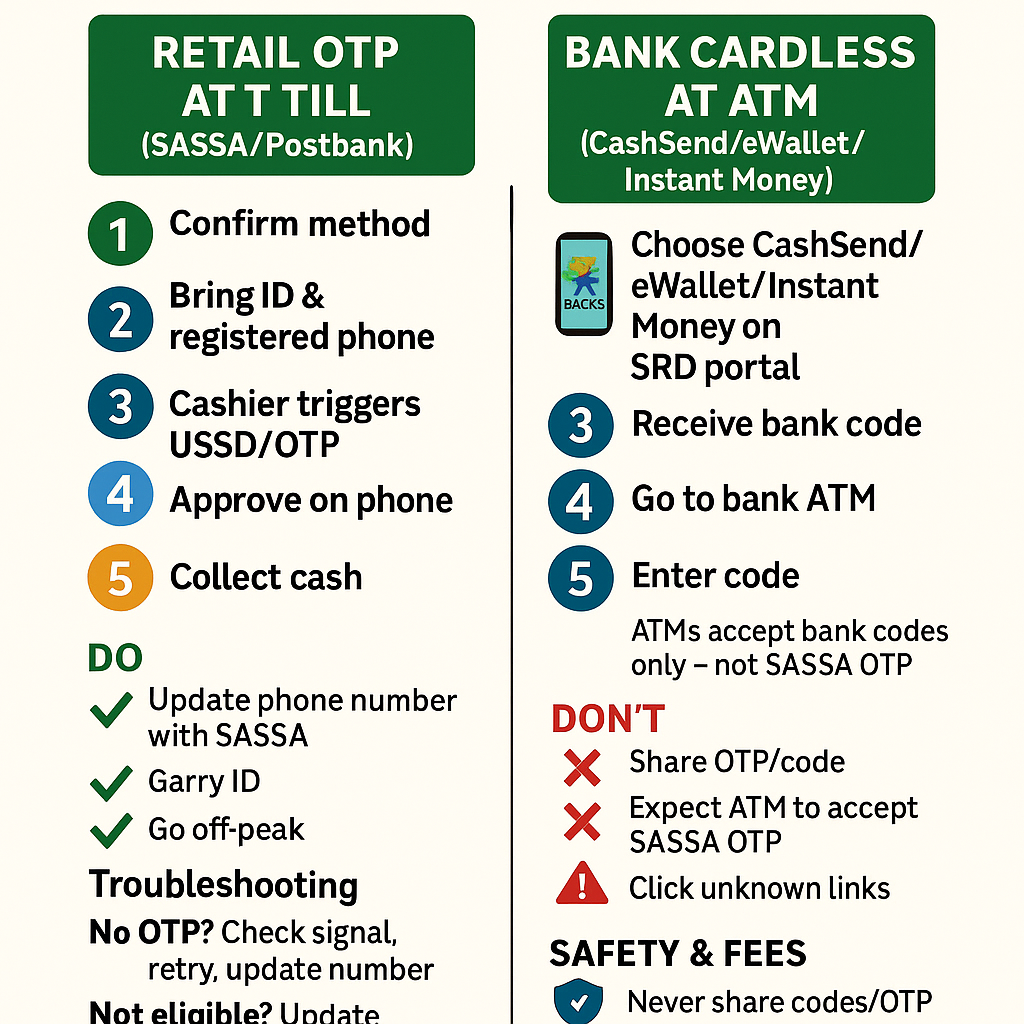
What “SASSA OTP Withdrawal” actually means (and what it doesn’t)
In everyday language, people call any cardless payout a “SASSA OTP withdrawal.” But there are two different systems:
- Retail cardless (SASSA/Postbank): You go to a participating retailer (e.g., Shoprite, Checkers, Boxer, Pick n Pay, Usave) with your ID. At the till, the cashier verifies your ID + SASSA-registered cellphone and triggers a USSD/OTP prompt on your phone to approve the payout. You confirm, and they give you cash.
- Key idea: the OTP/USSD prompt is triggered at the till, not self-generated on the SRD website.
- Bank cardless (CashSend / eWallet / Instant Money): If your grant is set to a bank cardless service, the bank sends a collection code. You use that code at that bank’s ATM or partner outlet to get cash.
- Key idea: ATMs use bank codes, not a SASSA/Postbank “till OTP.”
Understanding this distinction keeps you from standing at an ATM waiting for a SASSA OTP that ATMs don’t accept.
Eligibility & requirements (for both routes)
- You’re an approved SASSA beneficiary (SRD or other qualifying grant) with funds due/paid.
- Your mobile number is correct on your SASSA profile (that’s where verification prompts go).
- Your ID is valid (green barcoded ID, Smart ID card, or valid temporary ID).
- You’ve set the correct payment method on the SRD portal (Retail cash vs Bank cardless vs Bank account).
- You’re at a location that supports your chosen method (retail cardless at a participating store; bank cardless at the right ATM/partner).
Tip: If your SIM was recently swapped or your number changed, update your number with SASSA first. Otherwise, the OTP/USSD prompt goes to the old phone.
How to choose or change your payment method (before you try to withdraw)
Cardless options depend on what you selected as your SRD payment method:
- Retail cash → use the retail OTP at the till route.
- Bank cardless (CashSend/eWallet/Instant Money) → the bank texts you a code; use it at that bank’s ATM/partner.
- Bank account → your grant lands in your bank; you use your bank’s normal or cardless tools.
If you need to switch, do it on the SRD portal (Banking Details section). You’ll verify any change with an OTP for your security. After SASSA confirms the update, wait for the next payment to land under the new method before trying to withdraw.
Route A — Retail “OTP at the till” (SASSA/Postbank cardless)
This is the simplest no-card path if you prefer stores over ATMs.
Where can you cash out?
Large national chains commonly support SASSA/Postbank retail payouts at selected stores: Shoprite, Checkers, Boxer, Pick n Pay, Usave, and sometimes Spar/selected partners. Not every branch participates every day (staffing, systems, or stock can vary), so if one store is busy or paused, try another nearby branch.
What to bring
- Your valid SA ID (or temporary ID).
- The cellphone registered on your SASSA profile (switched on, with signal).
- Your own presence (no third-party collects unless official proxy rules are met—see “Collecting on behalf” later).
Step-by-step (retail till flow)
- Tell the cashier you’re here for a SASSA/Postbank cash payout without a card.
- Show your ID and confirm your cellphone number on record.
- The cashier triggers a real-time check; you’ll receive a USSD or SMS prompt on your phone.
- Approve the request on your phone (follow the exact on-screen steps).
- The till confirms success, and the cashier hands you the cash plus a receipt.
- Count your cash and keep the receipt until you see the withdrawal reflected on your next statement or balance check.
Common hiccup: If the phone prompt doesn’t arrive within a minute, ask the cashier to retry once after you confirm signal. If you changed numbers recently, you must update SASSA first—cashiers can’t override a mismatched number.
Route B — Bank cardless (CashSend / eWallet / Instant Money)
If your payment method is set to a bank cardless product, you’ll receive a bank code (often two codes: a “send” code and a “PIN”). Use those at the issuing bank’s ATM or partner retailers to draw your cash. The exact names vary:
- ABSA – CashSend
- FNB – eWallet
- Nedbank – Cardless / Send-iMali
- Standard Bank – Instant Money
Step-by-step (ATM/partner flow)
- Wait for the bank SMS with your collection code(s) once payment clears.
- Go to that bank’s ATM (or listed partner retailer).
- Choose Cardless / CashSend / eWallet / Instant Money on the screen.
- Enter the code(s) and withdraw the exact amount allowed by the code.
- Keep the ATM slip. If the cash didn’t dispense but your code now reads “used,” contact the bank helpline immediately.
Important: An ATM will not accept a SASSA/Postbank retail OTP. It only accepts that bank’s own code. If you want ATM access without a card, choose bank cardless as your SRD option first.
Postbank branch counter (fallback option)
If you can’t complete a retail till or bank cardless withdrawal (poor signal, mismatched number, device issues), you can visit a Postbank point or SASSA-linked counter for assistance. Bring your ID, know your cell number, and carry any SASSA reference you have. Staff can verify your identity and help you complete a payout or guide you on switching methods.
Fees, limits, timing, and practical expectations
- Fees vary by channel:
- Retail till withdrawals are often low-fee or free for the beneficiary (retailers have agreements with Postbank; policies can differ by chain and by time).
- Bank cardless (CashSend/eWallet/Instant Money) usually attracts send fees and/or withdrawal fees set by the bank.
- Limits: Bank cardless codes often have per-transaction caps; retail tills may limit per-visit cash based on store cash levels.
- Timing:
- If your SRD status shows “Paid”, retail till payouts typically work the same day (subject to store systems).
- Bank cardless codes sometimes arrive immediately; other times there’s a short delay.
- Network downtime happens (especially at peak times). If the till/ATM is down, try another store/ATM or go during off-peak hours.
Pro tip for peak days: Go early morning or mid-afternoon (avoids open/close rush). Have a Plan B store in the same area.
Troubleshooting: when things don’t work
“I didn’t receive the OTP/prompt at the till.”
Check signal first. Confirm the phone number on your SASSA profile is the one in your hand. If your number changed, update SASSA before trying again. If signal is weak, step outside, toggle flight mode, or try another store with stronger coverage.
“The OTP expired.”
Prompts are time-limited. Ask the cashier to re-trigger once you’re sure you have stable signal. If you’re stuck in a long queue, don’t start the process until you’re actually at the till.
“The ATM says code invalid.”
You’re likely mixing systems. SASSA/Postbank retail OTP won’t work at an ATM. You need the bank’s cardless code issued by the bank. If you do have a bank code and it’s still rejected, check expiry, correct bank, and exact amount.
“My number is wrong on the system.”
Update your number via the SRD portal or at a SASSA office. Bring your ID. Only the registered number receives prompts/codes.
“Payment shows ‘Paid,’ but the till/ATM still refuses.”
Give it a little time (systems reconcile). If it still fails:
- Try another participating store/ATM.
- For retail till: ask the cashier to retry once the prompt appears on your phone.
- For bank cardless: re-read the SMS instructions—some banks require a two-step code (a send code and a PIN).
“The store says their system is down.”
It happens. Stores occasionally pause payouts during system refresh or cash shortages. Try another store in the same chain or a nearby partner chain.
“I was debited but didn’t get cash.”
Keep your receipt/SMS, note time & branch, and contact the relevant helpline (bank helpline for bank codes; Postbank/SASSA support for retail till issues). Disputes are easier to resolve with proof.
Safety & fraud prevention
- Never share codes or OTPs with anyone. Not with a “helper,” not with a “bank agent” on WhatsApp, not with a random number.
- Don’t click links from unknown SMS senders claiming to “fast-track” payouts.
- Keep your phone line secure (SIM-swap scams are real). If you’ve had a SIM swap, update your number with SASSA.
- Shield the keypad at ATMs, and check for skimmers.
- Count your cash discreetly and store your receipt.
If something smells off, rather walk away and call an official helpline.
Accessibility: if you’re elderly, bedridden, or need a proxy
- In-person help: Ask a family member to accompany you to the retailer/post office—you must be present with your ID unless formal proxy arrangements are in place.
- Collecting on behalf: In special circumstances (e.g., medical incapacity), speak to SASSA/Postbank about authorized representatives and required documents (e.g., affidavits/medical proof).
- Home-visit requests: Where available, request assistance through official channels if you truly cannot travel.
Which route should you choose?
Retail OTP at the till if:
- You prefer straightforward ID + phone verification.
- You live near a busy retailer with reliable systems.
- You don’t want to manage bank app codes or ATM steps.
Bank cardless (CashSend/eWallet/Instant Money) if:
- You already bank with ABSA/FNB/Nedbank/Standard Bank and understand their cardless flows.
- You can reach the issuing bank’s ATM easily.
- You need to send yourself/others bank cash codes regularly.
Quick comparison (at a glance)
Feature | Retail OTP at Till (SASSA/Postbank) | Bank Cardless (CashSend/eWallet/Instant Money) |
|---|---|---|
Where you withdraw | Participating retailers (at the cashier) | Issuing bank’s ATMs or partner retailers |
Code type | USSD/OTP prompt triggered at the till | Bank-issued code(s) sent by SMS/app |
What you need | ID + registered cellphone | Bank code(s) + the correct ATM/network |
Typical fees | Often low or none for beneficiary | Bank send/withdrawal fees may apply |
Common issues | Store system down, poor signal | Wrong bank/ATM, code expired/used |
Best for | People near big retailers; no bank setup | People comfy with bank apps and ATMs |
Example day-of-withdrawal game plan
- Check grant status (paid/pending).
- If retail OTP: pick two nearby participating stores (Plan A and B), take ID + phone, go off-peak, approve the till prompt, collect cash, and keep the receipt.
- If bank cardless: wait for bank code, go to that bank’s ATM, choose the right menu, enter the exact code(s) and collect cash; keep the slip.
- If anything fails, switch stores/ATMs once; then call the official helpline before attempting again.