How to Update an Existing SASSA R350 Application (2025 Guide)
Updating your SASSA application usually takes 20 to 30 minutes, including verification steps. This short amount of time could make the difference in ensuring you receive your grant without delay.
The South African Social Security Agency (SASSA) provides the SRD R350 grant to eligible individuals in need of temporary financial relief. But life situations change — and so might your contact details, income, or banking information. If you’ve already applied for the R350 grant and need to make changes, it’s important to understand how to update your existing application correctly to avoid delays or rejections.
In this guide, we’ll walk you through how to update your SASSA R350 application, what changes are allowed, step-by-step instructions, and what to do if your update fails.
Why Updating Your SASSA R350 Application Matters
Too many beneficiaries assume that once they’re approved, they don’t need to touch their application again. But SASSA requires accurate, up-to-date information to process payments smoothly. If details don’t match across databases like Home Affairs, banks, or mobile operators, the system automatically flags your application, leading to delays.
Imagine these scenarios:
- You’ve lost your SIM card and SASSA sends your OTP (One-Time PIN) to your old number. You won’t be able to log in.
- You opened a new bank account but forgot to update SASSA. Your payment bounces back.
- You moved to another province, and SASSA can’t verify your address.
Each of these simple issues could block your grant. Updating your application ensures SASSA has the right information, so you continue receiving your R370 (updated in 2024) without interruptions.
Who Can Update Their SASSA R350 Application?
Not everyone needs to make changes, but if your situation has shifted, updating is essential. You can update your SRD application if:
- ✅ You already have an application reference number.
- ✅ Your personal details have changed (phone, email, address).
- ✅ Your banking details have changed (new account, bank switch, or card replacement).
- ✅ Your work or income status has changed.
- ✅ You spotted an error (like a typo in your ID or banking details).
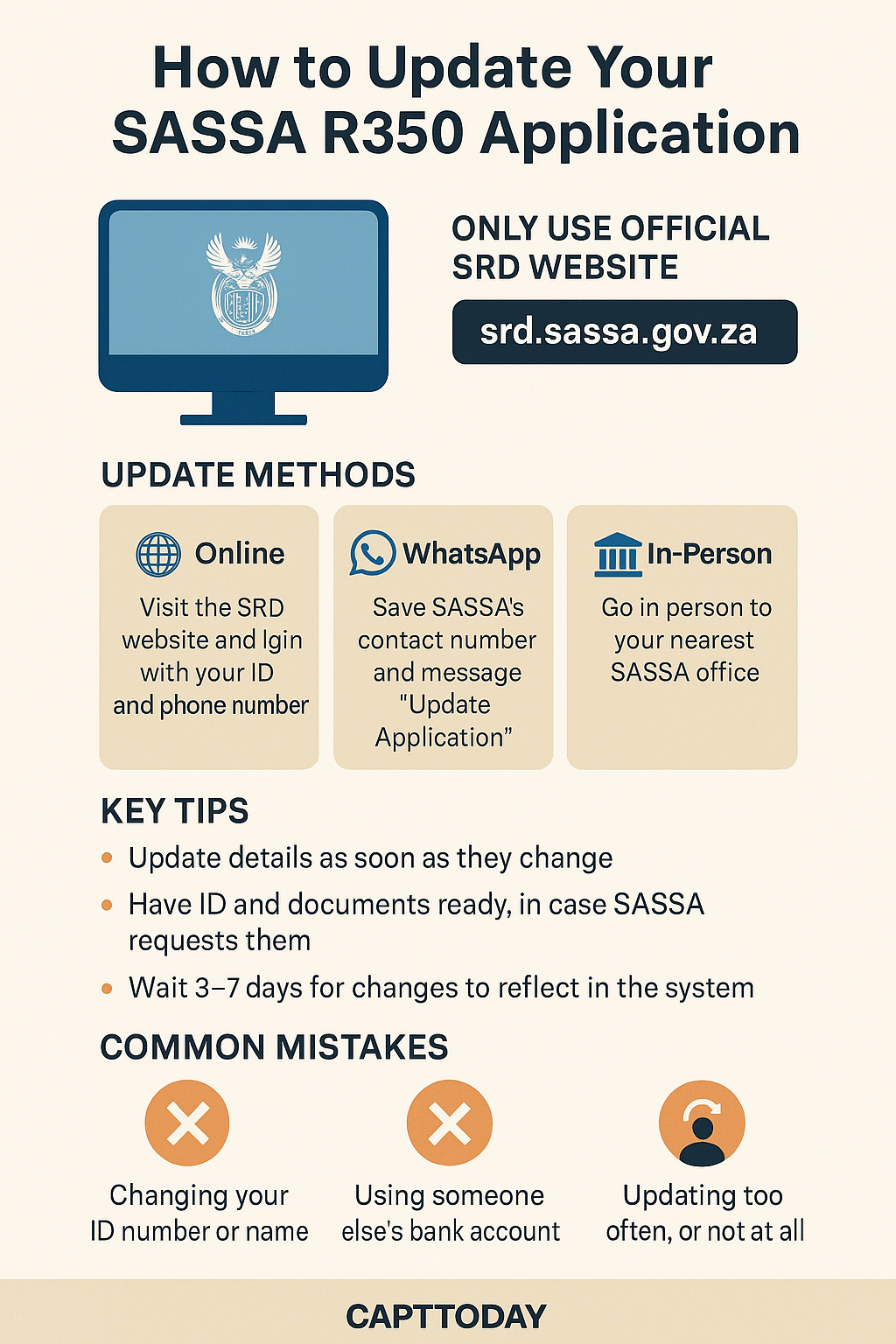
Note: You cannot update your ID number or full name. These are locked to prevent fraud.
What Changes Can Be Made to an Existing R350 Application?
You are allowed to update the following parts of your application:
|
Information Type |
Can It Be Updated? |
|---|---|
|
Phone Number |
✅ Yes |
|
Banking Details |
✅ Yes |
|
Residential Address |
✅ Yes |
|
Email Address |
✅ Yes |
|
Employment Status |
✅ Yes |
|
Consent for Verification |
✅ Yes |
You cannot change your ID number or reapply with a different name — these are locked to prevent fraud.
When Should You Update Your Application?
Timing matters. Delays in updating your application can result in missed or rejected payments.
You should update your application immediately if:
- You’ve changed your phone number.
- You’ve switched or opened a new bank account.
- You’ve moved to a new address.
- You’ve lost your SIM card.
- Your employment status has changed.
Real-Life Example
Maria from Johannesburg changed her cellphone number after losing her old SIM card. She didn’t update her application, so when SASSA sent her OTP, she couldn’t log in. After a 3-week delay, she finally visited a SASSA office and updated her number — only then could her payments resume.
Where to Update Your SASSA Application
You have three official options:
- Online via the SRD portal (fastest).
- WhatsApp (for those with limited internet).
- In-person at a SASSA office (for applicants with no online access).
⚠️ Avoid third-party websites or “agents.” Updates are free and only processed via official channels.
Step-by-Step: How to Update Online
Updating online is the most efficient method. Here’s how:
- Visit the Official SRD Website
- Go to https://srd.sassa.gov.za.
- Scroll to “Update Your Existing Application”
- Look for “Change Your Details” or “Update My Application.”
- Enter Your ID & Phone Number
- Input your 13-digit South African ID and the cellphone used during registration.
- Verify with OTP
- SASSA will SMS you a One-Time PIN. Enter it within 5 minutes.
- Select What to Update
- Options may include:
- Banking details
- Contact information
- Address
- Employment status
- Options may include:
- Save & Submit
- Review your updates carefully and click Submit.
- You’ll receive SMS confirmation.
How to Update SASSA R350 Application via WhatsApp
If you do not have access to the internet or are unable to update your application through the website, you can use WhatsApp as an alternative method:
Step-by-Step WhatsApp Update Process:
- Save the official SASSA WhatsApp number: 082 046 8553
- Open WhatsApp and start a new chat with the number
- Type “Update Application” and send the message
- Follow the menu prompts provided in the chat
- Enter your ID number and mobile number when asked
- Choose the type of information you want to update
- Submit the changes and wait for confirmation
📌 This method is useful for people in remote areas or those who struggle to access the website.
Updating at a SASSA Office
If online or WhatsApp options fail, visit your nearest SASSA office.
What to bring:
- South African ID (or refugee/asylum documentation).
- Proof of address (like utility bill).
- Bank statement (if updating banking).
- Old SIM card affidavit (if changing number).
Process:
- Request the SRD Update Form.
- Fill it in clearly.
- Attach supporting documents.
- Submit and get a reference slip.
- Updates reflect within 7–14 working days.
How to Change Banking Details
Since banking issues are the top cause of failed payments, let’s expand on this section.
Steps:
- Go to: https://srd.sassa.gov.za.
- Scroll to “How do I change my banking details?”
- Enter your ID number.
- You’ll get an SMS with a secure link.
- Open the link and enter:
- Bank name
- Account number
- Account type
- Branch code
- Submit and wait for verification.
⚠️ Banking Tip: Your bank account must match your ID number. Shared or joint accounts are rejected.
Required Documents to Have Ready
While updating your application, you may be asked to verify certain changes. Keep these on hand:
- South African ID or Smart Card
- Proof of residence (e.g., utility bill or lease agreement)
- 3-month bank statement (for bank updates)
- RICA-registered cellphone number
Processing Timeline
How long updates take:
|
Update Type |
Minimum Time |
|---|---|
|
Banking Details |
3 days |
|
Contact Number |
Instant |
|
Address |
3 days |
|
Employment Status |
3 days |
How Long Does It Take for SASSA to Process Updates?
Generally, it takes 3–7 working days for SASSA to verify updates like banking or employment status.
Banking detail updates: 3–5 days
Contact number changes: Instant or 1 day
Employment status change: 3–7 days
If it takes longer, you can contact the SASSA helpline: 0800 60 10 11.
What to Do If Your Update Fails or Is Not Reflected
If your update isn’t saving or shows no change after several days:
Try again using a different browser (Google Chrome works best)
Clear cache and cookies before logging in
Ensure your SIM is RICA-registered to receive OTPs
Contact SASSA support for manual correction:
Phone: 0800 60 10 11
Email: srd@sassa.gov.za
Social media: Twitter @OfficialSASSA
Common Mistakes to Avoid
|
Mistake |
Why It Matters |
|---|---|
|
Using someone else’s bank account |
Will cause rejection |
|
Entering the wrong OTP |
Will block access temporarily |
|
Updating multiple times a day |
May flag your application as suspicious |
|
Not checking the confirmation SMS |
You won’t know if the update succeeded |
Can You Reapply If Your Application Was Rejected?
Yes. If your existing application was declined, you can:
Submit an appeal via the same portal within 30 days
Correct and update your details, then reapply if needed
Use the “Appeal” section on the SRD website to lodge your request.
How to Contact SASSA for Application Support
If you’re struggling with updates or facing technical issues, reach out to SASSA:
Toll-Free Number: 0800 60 10 11
Email: srd@sassa.gov.za
Twitter: @OfficialSASSA
Facebook: SASSA News or regional pages
Visit your nearest SASSA office for in-person help if online channels fail.
Troubleshooting Failed Updates
Sometimes updates don’t go through. Here’s what to do:
- OTP not received?
- Check if SIM is RICA-registered.
- Try resending after 5 minutes.
- Update not saving?
- Clear browser cache and try again.
- Use Google Chrome or Mozilla Firefox.
- Bank rejected?
- Ensure account is active and in your name.
- Still not working?
- Call 0800 60 10 11.
- Email srd@sassa.gov.za.
Scam Alerts
Sadly, scammers target grant beneficiaries. Watch out for:
- Fake SMS links asking for your ID and PIN.
- “Agents” who claim they’ll update faster for a fee.
- WhatsApp numbers that aren’t 082 046 8553.
👉 Rule: SASSA never charges for updates. Only use srd.sassa.gov.za.
Real-Life Testimonials
- Thandi (Cape Town): “I moved provinces and forgot to update my address. My payments froze. Luckily, I went online and fixed it within 3 days. Payments resumed the next cycle.”
- Sipho (Durban): “I changed banks but didn’t notify SASSA. My money kept bouncing back. Updating banking details online solved the issue.”
- Nomsa (Pretoria): “I lost my SIM card and couldn’t log in. Visiting a SASSA office was the only way to update my number. It took a week, but it worked.”
Final Thoughts
Keeping your SASSA SRD R350 application up to date is crucial to ensure you receive your grant without issues. Whether you’ve changed your phone, bank, or home — making quick and accurate updates through the official SRD portal can save you from delays or rejection.
Remember to verify all your information and keep an eye on your SMS alerts. If you run into issues, SASSA support is available to guide you. Stay informed, stay updated, and make sure your grant works for you.